Typework — Your AI coworker for everyday business

A public read before the private product details.
- Problem
- Typework had a dense, fast-growing AI dashboard. Users needed a clearer path from a question to a trustworthy, editable result.
- Design decisions
- I unified navigation and tokens, separated quick answers from deeper tasks, and made progress, sources, artifacts, and recovery states visible.
- Shipped / implemented
- Selected React surfaces, browser-validated flows, responsive rules, 14 industry landing experiences, 20+ Chat states, and three-language localization.
- Public evidence
- Before/after UI, state matrix, and short interaction loops are public. No quantified business outcome is available to share at this time.
Turning an AI dashboard into a place people can trust.
Typework is an AI workflow and dashboard SaaS for small and medium-sized businesses in the US. My job was to make a dense, fast-growing product feel legible: clarify the system, make AI actions understandable, and help every useful output lead to a next step.
I worked from the UI audit through the detail work after launch: rebuilding the high-fidelity system in Figma, handing HTML prototypes and design tokens to engineering, then validating the real flows in the browser. AI never generated a deliverable on my behalf. I used it to explore visual directions, sharpen design decisions, make tiny frontend tweaks after QA, and assist with review and Git collaboration.
- 01IdeateUse AI to explore directions, then make the design call.
- 02PlanDefine the product problem, scope, and priorities.
- 03DesignBuild the high-fidelity system, states, and tokens.
- 04HandoffGive engineering HTML prototypes and design tokens.
- 05DevelopEngineering implements the production interface.
- 06Verify + tweakQA in browser, then use Codex for tiny UI fixes.
- 07Git + PR reviewUse AI to support review and Git collaboration.
- 08IterateReview what shipped and tighten the next pass.
First, I made the product behave like one product.
I restructured the visual language around a shared set of tokens for color, type, spacing, radii, and states. I redrew the navigation icons, tightened hierarchy across the Dashboard, and designed responsive rules so the same system could adapt instead of simply shrink.
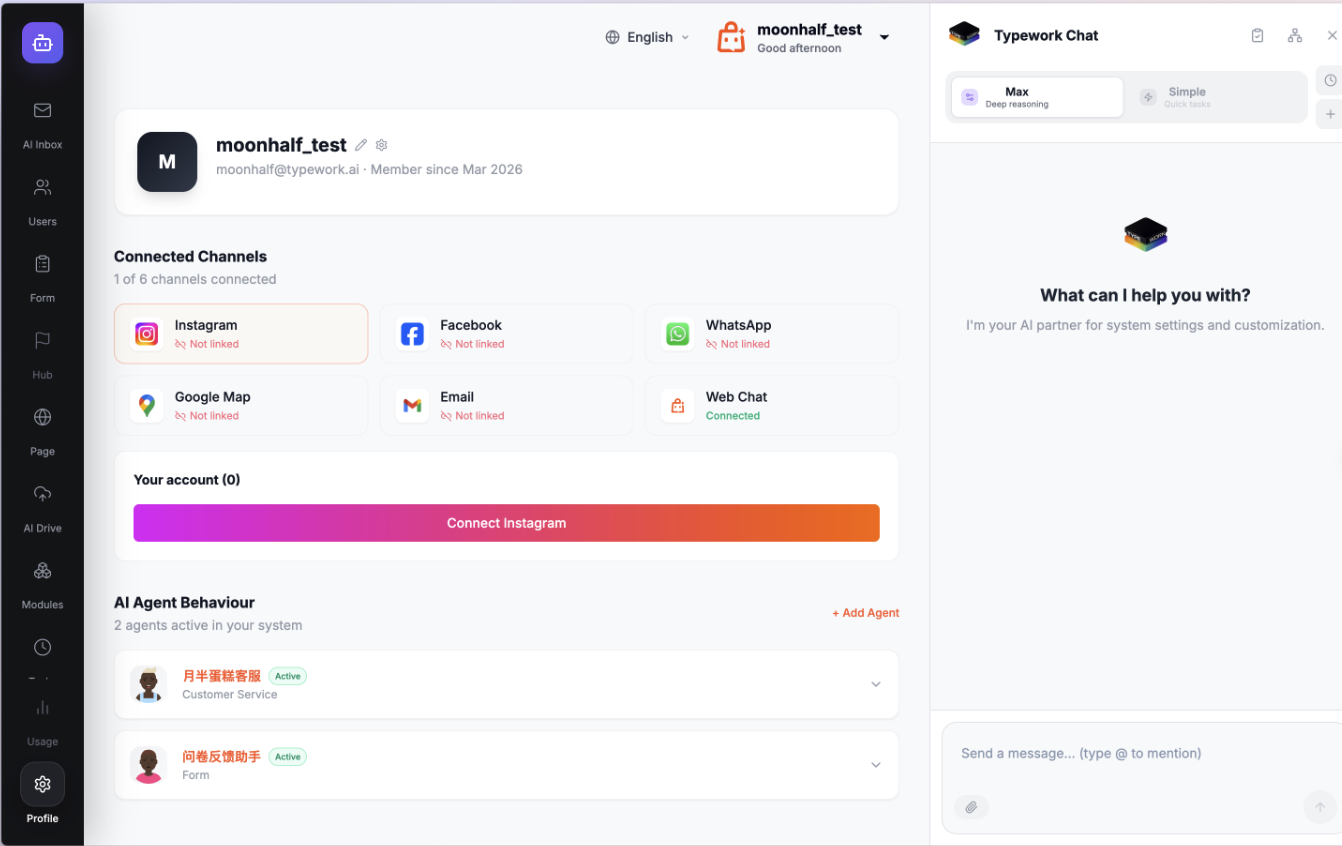
Before redesign
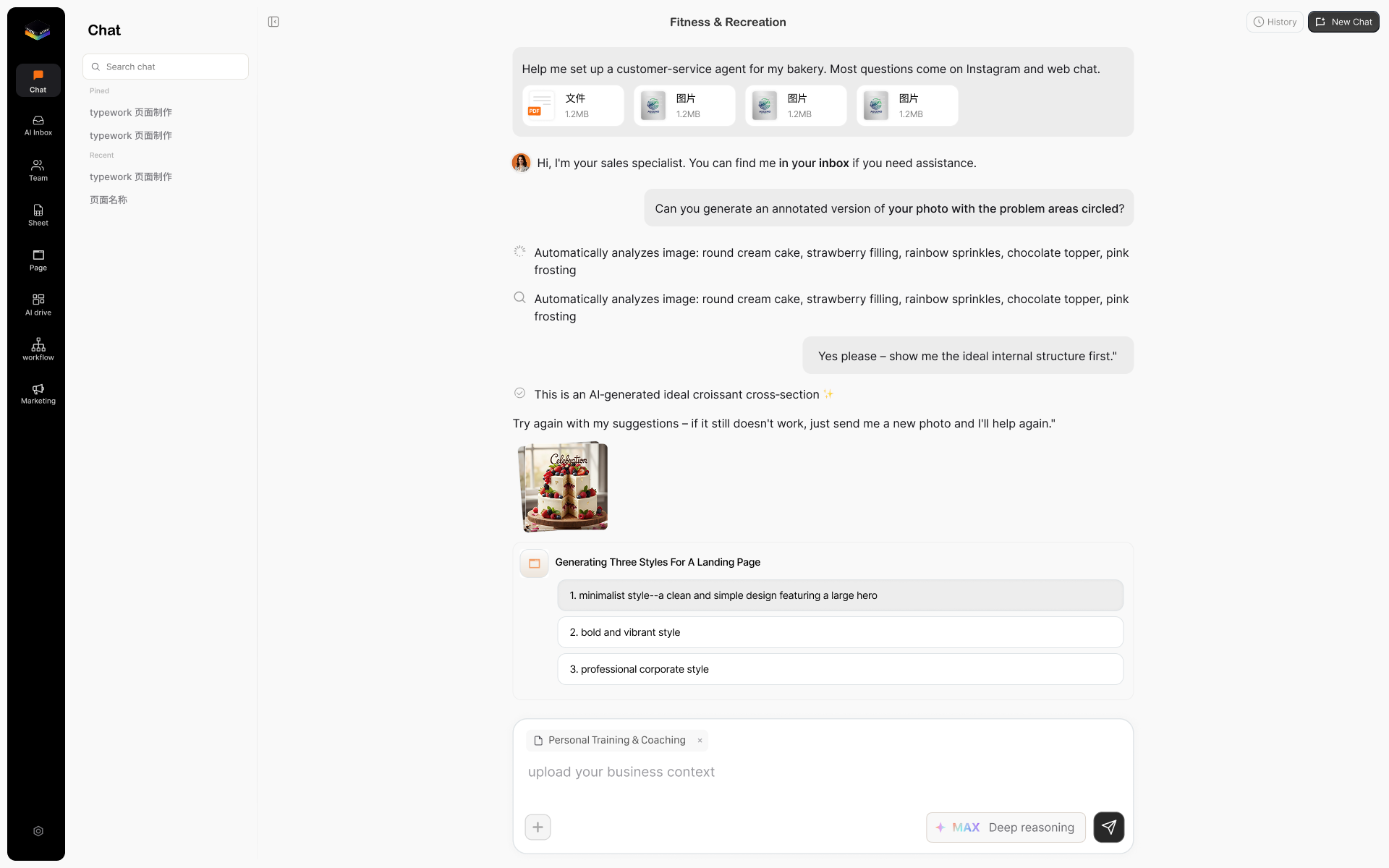
After redesign
Then I designed the conversation around momentum.
Chat is not just a prompt box. I gave users clear model and mode choices, made sources and generated artifacts inspectable, and used feedback states to show what the system was doing. The goal was to turn a vague AI answer into a usable, editable next step.
Some of the work is private.
The screens and interaction details below contain confidential company IP. Request access and I will send you a private walkthrough.
A five-second loop: search, reference, and response states stay visible without making the page a product demo.
File context remains visible while the agent works, so a multi-file request never becomes an opaque loading state.
Agent setup is reduced to a short, reversible sequence: name the channel, choose its audience, then configure access.
The happy path was only the beginning.
I personally tested the interactions in the browser and designed the states around what can go wrong: empty searches, slow generation, missing permissions, quota limits, attachments, history, and recovery. In each case, the interface explains what happened and gives the user a clear way forward.
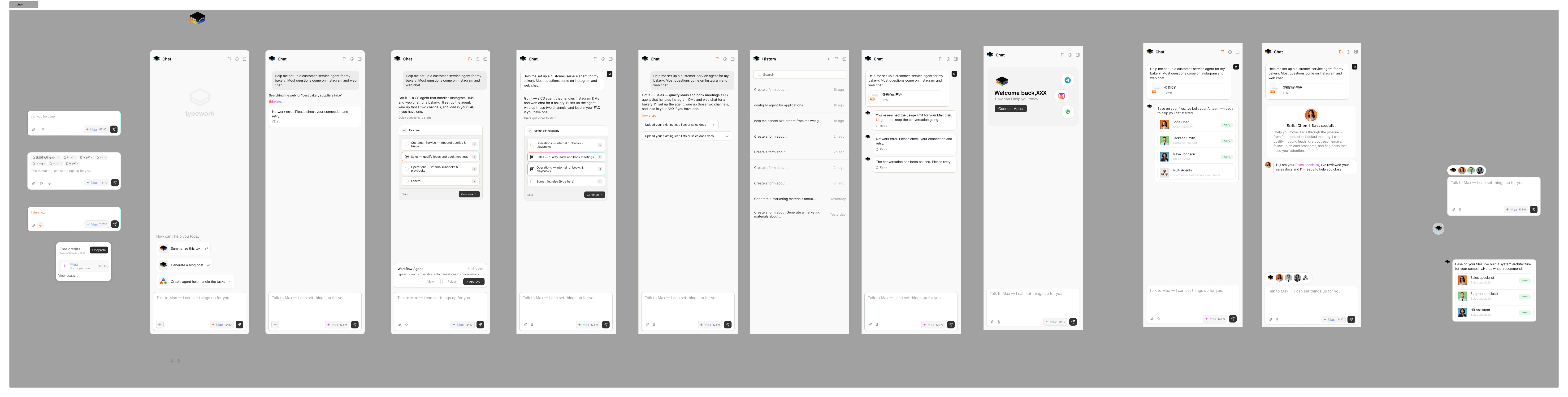
Design, code, review, repeat.
I moved between Figma and the browser throughout the build. With Codex and other AI coding tools, I translated high-fidelity decisions into working Web UI, then reviewed each change, helped merge branches, and checked the knowledge-base assistant surfaces before they shipped.
A quick pass across Sheets, Workflows, Pages, and Settings: the system has to hold together beyond the Chat surface.
The embedded assistant stays available while users create and revise a live marketing page, keeping the workflow in one place.
From interface cleanup to conversion momentum.
The redesign turned a scattered dashboard into a clearer path from question to action: users can discover a capability, understand the AI's progress, inspect the result, and continue editing it. The shared system supports 14 industry landing experiences, 20+ Chat states, and three-language localization while keeping design and implementation aligned.
Takeaway
For AI products, trust comes from making the invisible visible: clear mode choices, progress feedback, recoverable edge states, and outputs users can inspect and continue working with.